




Every organization deals with a team who take the responsibility of all type of email task. There are so many emails that are much important for the organizations. And, sometimes the situation may arise where you need to change MSG email to PDF online without losing a single email. We have received so many queries related to the MSG email messages to PDF conversion. One of the popular have been discussed below.
User Query – I am working for a reputed IT organization as a Team Leader and a few days back I got the task of saving Outlook MSG email messages to PDF document file format with all its attachments. And, do you know the files are very large in numbers that is approx 15000+ emails? It means now my job is for searching appropriate solution to batch export from Outlook MSG emails to PDF. So, can you suggest me any suitable technique to change MSG email to PDF online in bulk mode?
Don’t worry, if you have a query as we have described above because you will get the finest key to resolve your problem at this place. Today, we are here to discuss about the fantastic and most trusted MSG to PDF Converter software that supports users to change MSG email to PDF online without any single problem. It is the direct technique available in a marketplace which is perfectly designed by a best group of professional as per the user requirements. To explore the software completely, you need to read out the further material of this blog post. So, keep reading…
MSG to PDF Converter Tool for Mac or Windows Editions
Are you finding the best solution for exporting MSG email data to PDF document format? Then, must try the CubexSoft MSG to PDF Converter Tool that is the perfect suggestions from topmost experts. This program is a simple and direct way to save MSG email database into PDF format without any stress. It comes with some advance benefits and features also that we will discussed in the further section. But, first let’s go to discuss the working guide to convert MSG files to PDF format.
Working Guide for Windows Users -
- Download the MSG Converter on Windows machine.
- Open the program and choose Select File or Select Folder option for adding the MSG emails that you need to save into PDF.
- After adding the files, go to click on the Next button that shows you a new screen.
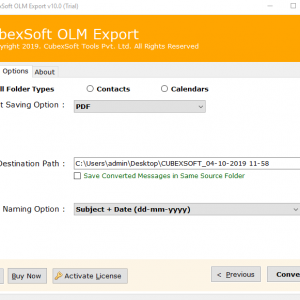
- Choose the folders and click on the Next. Then, select PDF as saving output option and avail all its advance options and filters.
- Locate the path for your PDF output files. And, move to the Convert button that will show you a live conversion process.
Working Guide for Mac Users -
- Run the MSG to PDF Converter for Mac and open it properly.
- Use Add Files or Add Folders option and import MSG files. And, click Next.
- Now, check or uncheck the MSG folders for conversion and again, click Next.
- Go to choose PDF as output format and use multiple option that will appear on the screen.
- Choose the destination for saving PDF and click on the Export button.
Why to Choose Mac MSG File to PDF Converter?
- It is a safe and secure method to convert MSG files to PDF directly.
- It gives option to move bundles of MSG email folders to PDF at once.
- It offers different file naming options that manages output PDF files.
- It facilitates advance PDF and attachment option to save into PDF.
- It includes some amazing filters also that helps to export important files.
- It gives the facility to choose destination path for output PDF files.
- It supports all Mac and Windows editions without any problem.
- It contains a simple user familiar interface for all types of users.
Final Verdict
In the above discussion, we have explained the trustworthy solution to change MSG email to PDF online without any stress. Now, anyone can freely go to download and use free download facility of this professional utility. With the free download edition, you can save first 25 emails from MSG to PDF format without any cost.